17 of the coolest hidden Google tricks

Google is awesome.
1. Walking to Mordor:

If you’ve ever watched The Lord of the Rings: The Fellowship of the Ring (or just seen various versions of the meme) you may never stop laughing at this Google Maps quirk (or maybe it’s just me). If you try to get walking directions from “The Shire” or “Rivendell” to “Mordor” (and ignore the suggestions that pop up), Google will give you the route… and a warning. In other news, according to my Google Maps, Mordor is located just outside Cape Town, South Africa. Nice.
2. Barrel roll:

Endlessly entertaining, this one trended worldwide on Twitter in November. Simply search “do a barrel roll” — if you have Google’s instant results functions enabled, your results page will be spinning before you’ve completed the instruction.
3. 42:

What is 42, you ask? Geez, it’s only the answer to life, the universe and everything. Ok, so if you’ve never read or watched The Hitchhiker’s Guide to the Galaxy, you won’t get this one. But Google’s built-in calculator will.
4. Gravity:

If, by any chance, you feeling like searching “Google gravity” and hitting “I’m feeling lucky”, don’t be surprised if Google comes crashing down around you the second you move the mouse.
5. Recursion:

Google pokes fun at its own “did you mean” suggestions if you search recursion (repetition or returning) by questioning your spelling even though you didn’t make a mistake.
6. Klingon:

So “GoogleDaq ylnej” means “Google search”. Hmmm. Who knew? Well, you, if you speak Klingon. Yes, there is a Klingon version of Google. There is also a pirate and Elmer Fudd version, if that’s more your thing.
7. Kerning:

Designers will love this one — kerning is the spacing between letters in a word. When you do a search for kerning, Google changes the spaces between letters in the word ‘kerning’ in all the results. Heehee. You see what they did there?
8. Hello, Nessy:

Picture this: You’re working under a tight deadline, your clock is slowly counting the minutes past 3AM and your coffee and Red Bull combo is failing. The sleep deprivation is starting to affect you — you are starting to see things. You click to your home page, and there, rising gracefully from the dark waves in your iGoogle theme, is the Lochness Monster.
No, you’re not hallucinating — you really did see Nessy. If you are ever awake and online at 3:14 AM (those are the first three digits in Pi, by the way. Gosh, those Google nerds), and have the iGoogle beach theme installed, Nessy will come to visit for a minute. If you’re not an insomniac, you can always just change the timezone on your computer and in your iGoogle settings and just wait until 14 minutes past the hour (I was in Bangkok last night, as far as Google knows).
9. Nagging Rams:

Similar to the ‘recursion’ response, if you search for ‘anagram’ (rearranging the letters in a word to make a new word or phrase, in case you didn’t know), Google rearranges the letters to suggest you were really searching for ‘nag a ram’.
10. Antarctic Penguins:

If you ever want to creep the Antarctic on Google Maps, you may be surprised to find the little orange peg man you drag and drop to change to Google Street View has transformed into a fat little penguin. Awwww.
11. Doodles:

What do you get if you don’t actually search for anything, and just hit ‘I’m feeling lucky’? A catalogue of all the Google doodles — all the way back to 1998. There were just three in that year — there have already been 69 in 2012.
12. Konami ninja:

If you type in the Konami code (a cheat code used in Konami games) in Google Reader, the side panel will turn blue and a cute ninja will appear on the left of your screen. Use your arrow keys and keyboard to enter the code — it’s up, up, down, down, left, right, left, right, followed by the letters B and A.
13. Street View team:

Ever wanted to see the people who work at Google doing cool things like Google Street View? Well, if you hop along to the back of the Google offices in Mountain View, you can see them all.
14. Laundry:

There are a lot of things Gmail can do for you — filter spam, flood you with ads, apply a plethora of pretty coloured labels to your messages — but, as yet, it can’t do your laundry. However, it is an option on the ‘suggest a feature’ page for Gmail.
15. Pacman:

It started out as a Google doodle to commemorate the 30th anniversary of Pacman in 2010, but the Google Pacman game was so popular, it was given a permanent home.
16. Zerg rush:
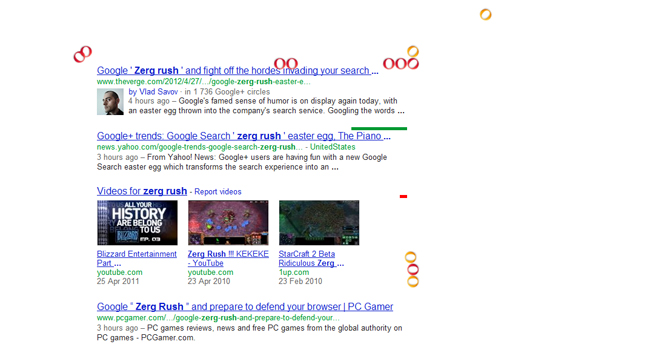
Google “zerg rush” and prepare to defend your browser against hordes of the letter ‘o’ in Google’s logo, which will start to destroy your search results. They’re apparently undefeatable, but you can try to fight them off by clicking on them and share your high score on Google +. For those who aren’t familiar with StarCraft, a ‘zerg rush’ is a tactic where swarms of aliens known as ‘zergs’ descend in multitudes in order to overwhelm their enemies.
17. You’ll never find Chuck Norris
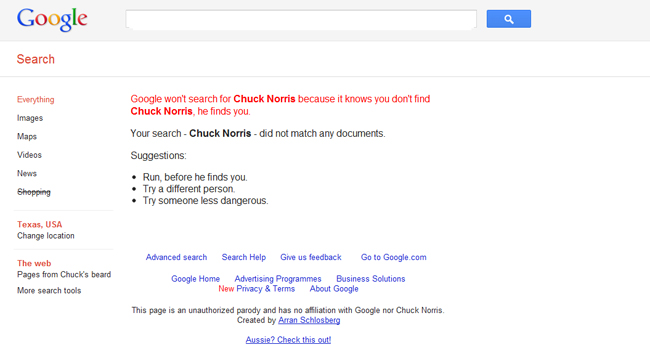
Because Chuck Norris jokes never get old, there is a warning hidden in Google search results to ward off those who dare to attempt to find him. Just search ‘find Chuck Norris’ and hit ‘I’m feeling lucky’ and you’ll see what I mean.
Comments
Post a Comment